Starting from scratch
Flexible, but time-consuming and error-prone unless you have strong modeling experience.
Professionally structured to reflect your business drivers, support credible decision-making, and provide a clear foundation for planning, financing, or investor discussions.
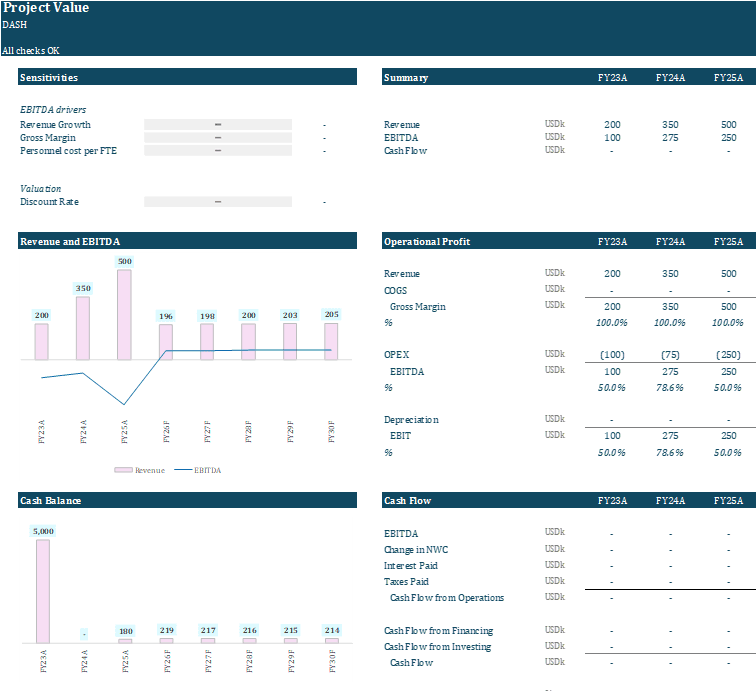
Building a financial model from scratch takes time and experience. Generic templates are rigid and hard to adapt. AI tools generate numbers quickly, but often lack a clean, usable structure. This approach gives you a guided way to generate a professional, editable Excel model that you can actually review, adjust, and use.
Flexible, but time-consuming and error-prone unless you have strong modeling experience.
Quick to download, but difficult to adapt to your specific business logic or assumptions.
Fast to produce, but often inconsistent and not structured as a usable financial model.
Built by professional financial modelers using clear structure, consistent logic, and spreadsheet design best practices.
Adjust revenue drivers, pricing, staffing, and key cost assumptions in one place while the model updates consistently across the forecast.
The income statement, balance sheet, and cash flow are fully linked so each assumption flows through the model with consistent logic.
Review the forecast through a structured output view with key metrics, trends, and visual summaries that make the model easier to interpret.
Once you complete the wizard, you receive a structured Excel workbook with the core forecast logic already in place, ready to review, adjust, and use.
Your inputs are translated into a professionally structured Excel model with integrated financial statements, built to support credible planning, financing, fundraising, and internal decision-making.
Capture the revenue drivers, cost structure, team, working capital, investments, and financing assumptions that shape your forecast.
Your inputs are converted into a custom financial model with integrated statements and a clear structure that is easier to review, explain, and adapt.
Download the workbook, adjust assumptions, test scenarios, and use it as a solid foundation for planning, lender conversations, investor discussions, or internal analysis.
Turn your growth story into structured projections for planning and investor conversations.
Build an operating forecast you can use for planning, budgeting, and management decisions.
Build a clear forecast that helps lenders assess repayment capacity and cash flow risk.
Build assumption-driven valuation scenarios you can explain to investors and stakeholders.
Created by a team of corporate finance professionals with more than a decade of experience building financial forecasting models.
$79
Start with a professionally structured financial model instead of spending hours restructuring templates or spending significantly more for a custom model build.
You complete a guided process on the website. The result is a fully functional Excel workbook that you download and own.
Yes. The Excel workbook is fully editable. Assumptions can be adjusted, new line items added and the forecast extended.
No. The wizard captures business inputs such as revenue streams and operating costs. The Excel workbook converts these into a structured financial forecast automatically.
The model follows a standard financial modeling structure with integrated financial statements and clear assumptions, making it suitable as a starting point for investor materials.
Most users generate a first structured version of their model in about 5–8 minutes. The workbook can then be refined and extended depending on the level of analysis required.
AI tools and generic templates can generate numbers quickly, but they rarely provide a clean driver-based Excel model with integrated financial statements. This template gives you that structure, which you can then refine further using AI.
The system covers common business structures well. For specialized situations the generated workbook still provides a structured starting point that can be extended.
Answer a few guided questions and download a structured Excel workbook you can refine, extend and use for real financial analysis.